

How to Uninstall Mac Apps and Remove Leftover Files
When you uninstall a Mac app, caches and support files can stay behind. Some hold settings and work you might want to use again.
WorksdemHow do you remove a Mac app and check what it leaves behind?
Start with the developer’s uninstaller if the app includes one. For apps without an uninstaller, move the app bundle to Trash. Use Diskivo’s Applications view to check related files before removing them.
Uninstall an app with its removal tool or Finder
-
Quit the app and look for its uninstaller
Check the app’s folder or the developer’s instructions. The developer’s tool is especially useful for apps that install extensions, drivers, or login items.
-
Move apps without an uninstaller to Trash
In Finder, open Applications and move the app you want to remove to Trash. macOS reserves some built-in apps for the system.
-
Check what you might need later
Look for documents, preferences, or licenses before removing app-related data. You manage any subscription separately.
How to uninstall an app with Diskivo
Diskivo brings the app bundle and the files it can associate with it into the Applications removal review. Check why a file was linked and decide which items to send to Trash.
-
Open the removal review
Quit the app you plan to uninstall. In Diskivo, open Applications, find the app, and click Remove….
-
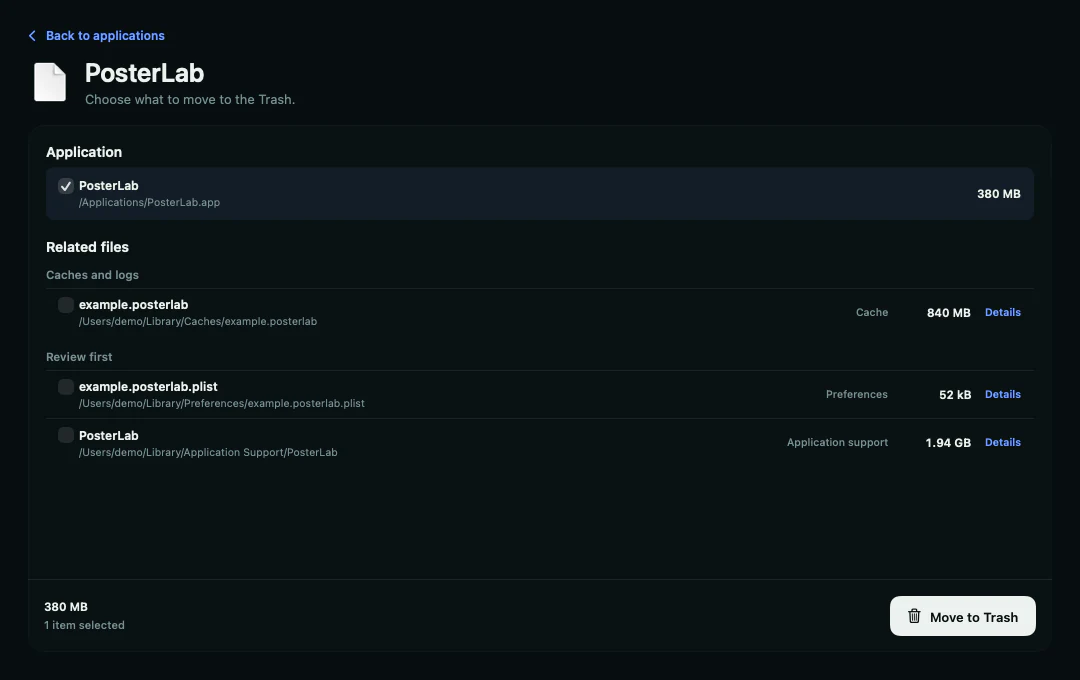
Check Related files
Open Details to see why Diskivo linked a file to the app and what it might contain. Pay particular attention to Review first. Containers and support files can contain documents or settings you may need later.
-
Confirm the items to move to Trash
Review the checkboxes for the app bundle and each related file. Clear the checkbox next to a file you want to leave in place. When the list matches your intended removal, click Move to Trash.
Which leftovers can you remove?
Review recognizable caches and logs
Check what each file is used for. Apps can often rebuild caches. Keep logs if you still need them to diagnose a recent issue.
Keep support files you still depend on
Preferences and containers can hold settings, databases, or documents. Keep anything you want to use after reinstalling or that another app relies on.
Frequently asked questions
Why does Diskivo say the list may be incomplete?
Diskivo flags folders it couldn’t read. The review only shows the related files it was able to detect.
Which leftovers should I keep?
Keep files containing data you still use or settings you want after reinstalling. Open Details to learn what each item may contain.
What if macOS says the app is in use?
Quit the app and close its windows. If the warning persists, follow the developer’s instructions for stopping background components before you try again.
Does uninstalling an app cancel its subscription?
You manage subscriptions separately through wherever you bought them, such as the App Store or the developer’s website.